Independent · Private by design

Quiet, private tools for reading and AI chats

Quiet Mooring Software makes small browser extensions that each do one job well. Save web articles to your Kindle as clean EPUBs, and keep your ChatGPT chats in folders you can search. Everything runs on your device.

  • Free to use
  • No account
  • Nothing uploaded to us
  • No ads or trackers
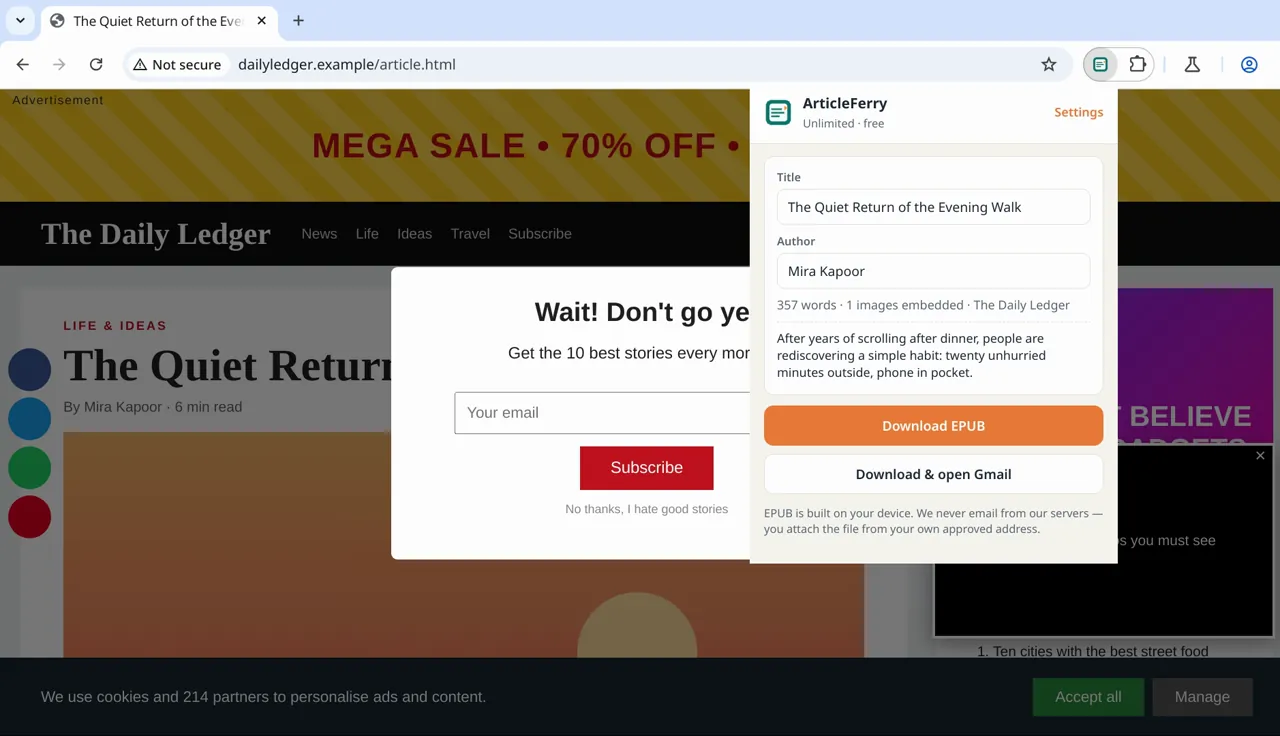
ArticleFerry turning a cluttered news page into a clean EPUB
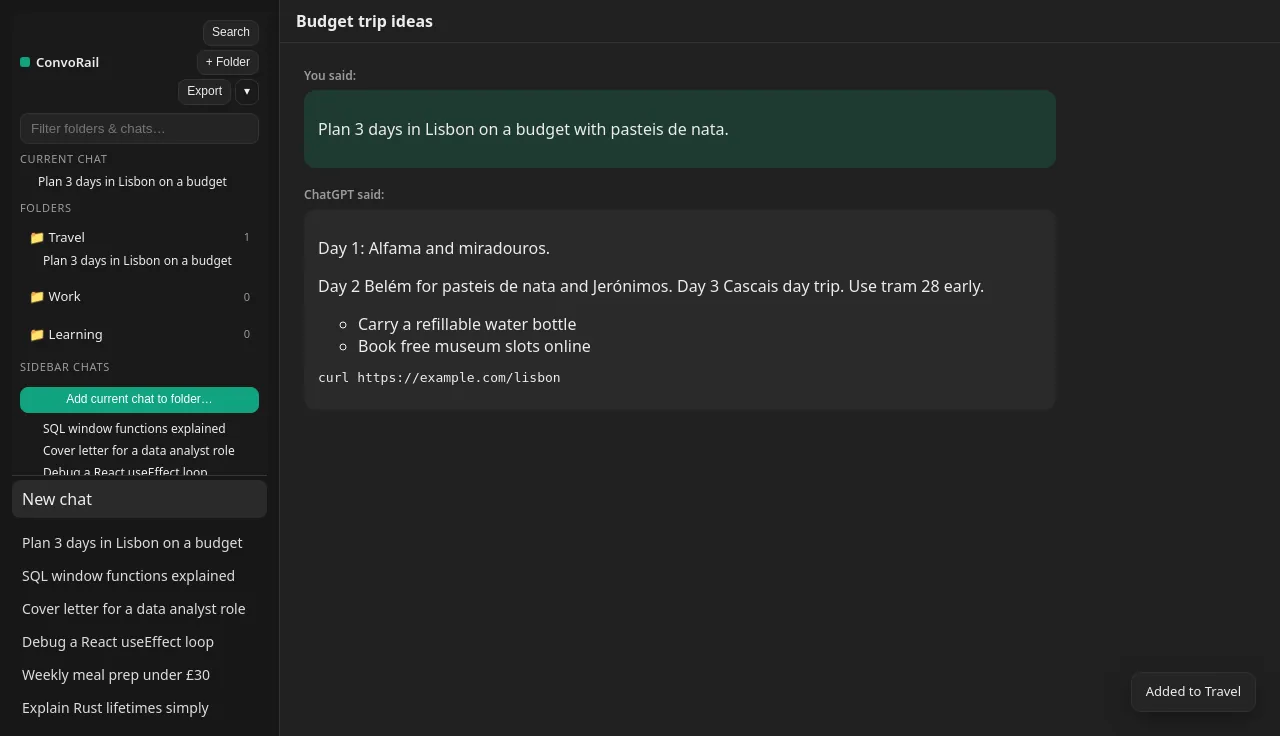
ConvoRail adding folders to the ChatGPT sidebar
ArticleFerry · web page to EPUB ConvoRail · folders for ChatGPT

The extensions

Two small tools, each doing one job well

Both are free and coming to Firefox, Microsoft Edge and Chrome. An optional Pro plan is planned for later; see pricing.

ArticleFerry popup over a cluttered news page, showing the article title, author and a Download EPUB button

ArticleFerry

Save pages as EPUB for Kindle

Turn any web article into a clean EPUB and send it to your Kindle.

  • Strips ads, pop-ups and clutter, keeps the article
  • Preview and edit the title and author before saving
  • EPUB built on your device, with images and a cover
  • Right-click “Send page to Kindle” from any page

Free. Store listings are in review; links appear here as soon as they are live.

Privacy first

Your reading and your chats stay yours

We build tools we would want to use ourselves: they work locally, ask for as little as possible, and never turn you into the product.

Runs on your device

Articles become EPUB files on your computer, and chat folders live in your browser. There is no server of ours in between.

No account needed

Install and use the free versions straight away. No sign-up, no email address, no password to remember.

No ads, no trackers

No analytics SDKs or advertising in the extensions, and this website loads no third-party scripts or fonts.

We never sell your data

We do not sell or share your data. Each product has a plain-English privacy policy: ArticleFerry, ConvoRail.

How it works

Up and running in a minute

  1. Install from your browser’s store

    Get it free from Firefox Add-ons, Microsoft Edge Add-ons or the Chrome Web Store. No account, no card.

  2. Use it where you already are

    Click the ArticleFerry icon on any article, or open ChatGPT and find your ConvoRail folders in the sidebar.

  3. Keep what you make

    EPUBs are saved as files on your computer. Folders stay in your browser, and you can export or back them up any time.

FAQ

Questions, answered

Are the extensions free?

Yes. Both are free to install and use, and every current feature is free and unlimited. An optional paid Pro plan is planned but not on sale yet; pricing shows what it will include.

Do I need an account?

No. The free versions work without any sign-up. There is no Quiet Mooring account to create.

Is my data uploaded anywhere?

No. ArticleFerry builds EPUB files on your computer and you email them yourself, from your own address. ConvoRail keeps folders and its search index in your browser. Details are in the ArticleFerry and ConvoRail privacy policies.

Which browsers are supported?

Firefox, Microsoft Edge and Google Chrome on desktop. The store listings are in review; the install buttons on this page switch on as soon as each one is live.

Are you affiliated with Amazon or OpenAI?

No. ArticleFerry and ConvoRail are independent products. Kindle and ChatGPT are named only to say what the extensions work with.

How do I get help?

Email quietmooringsoftware@gmail.com. We aim to reply within 5 business days. See Contact for what to include.

Questions before you install?

Write to us. A real person reads every email, and feature requests genuinely shape what we build next.