
 ConvoRail · free browser extension
Folders, search and export for your ChatGPT chats
ConvoRail adds folders to the ChatGPT sidebar, lets you search the titles and text of your chats, and exports any conversation to Markdown or JSON. Your data never leaves your browser.
Free. Store listings are in review; links appear here as soon as they are live.
- Free
- No account
- Data stays in your browser
Features
Finally, a tidy ChatGPT sidebar
For anyone with hundreds of chats: keep the ones that matter where you can find them again.
Folders and subfolders
Group chats into folders with one level of subfolders, right inside the ChatGPT sidebar.
Drag and drop
Drag a chat onto a folder, or use the menu. Alt+right-click a sidebar chat to file it fast.
Full-text search
Search chat titles and the message text of chats you have opened. Press Ctrl+Shift+F (⌘+Shift+F on Mac).
Markdown and JSON export
Save any conversation as clean Markdown for your notes, or JSON for your own tools.
Backup and restore
Export your folders and index as a backup file, and import it in another browser.
Nothing changes in your account
ConvoRail only remembers which folder each chat is in. Your chats stay exactly as they are.
How it works
Organised in minutes, not afternoons
Folders
Folders right beside your ChatGPT history
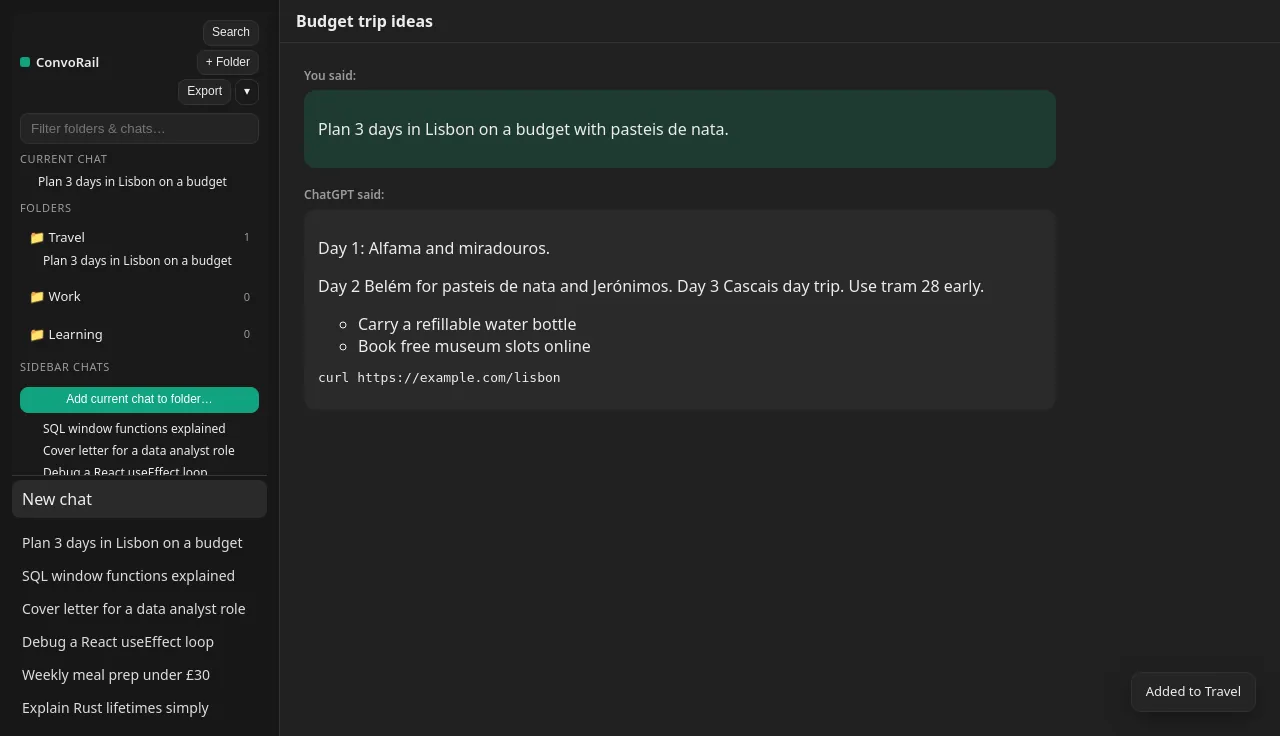
Create folders like Work, Travel or Learning and file chats into them. The current chat is always one click from a folder.
Search
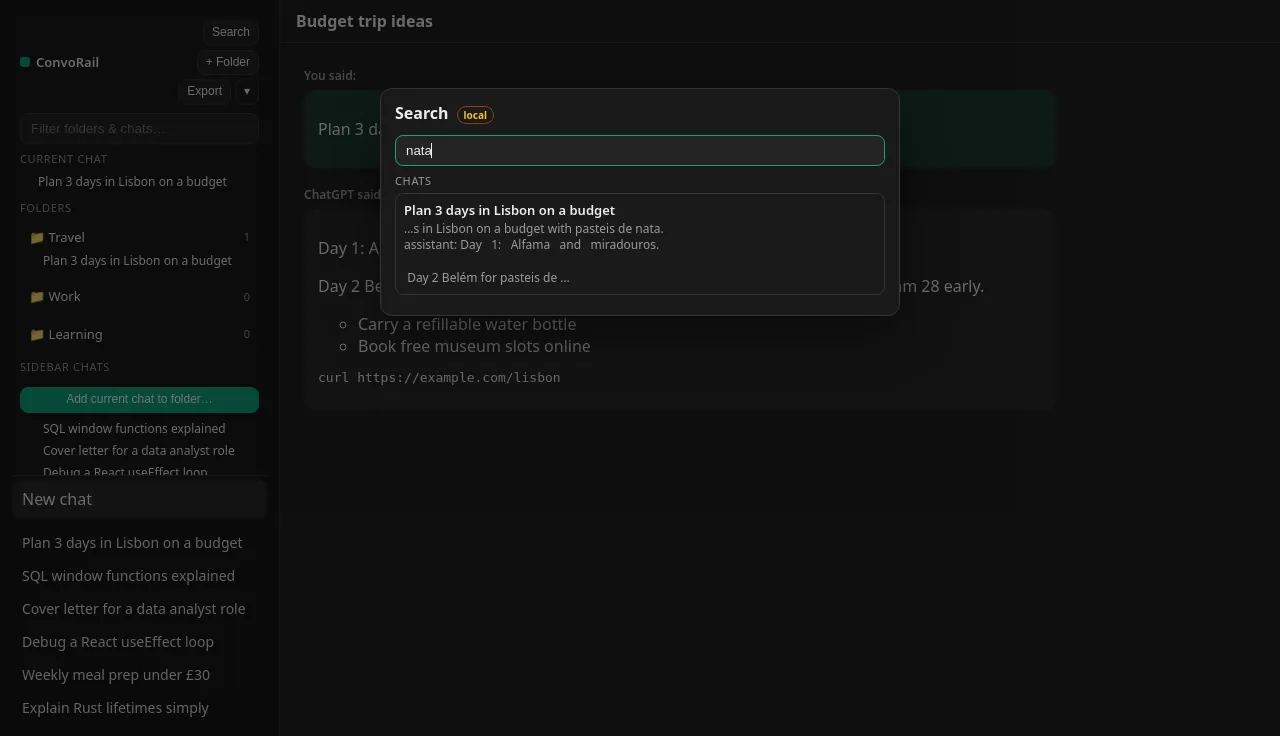
Find any chat you have opened, by what was said
Search covers titles and the message text of chats you have opened, indexed locally in your browser.
Export
Take your conversations with you
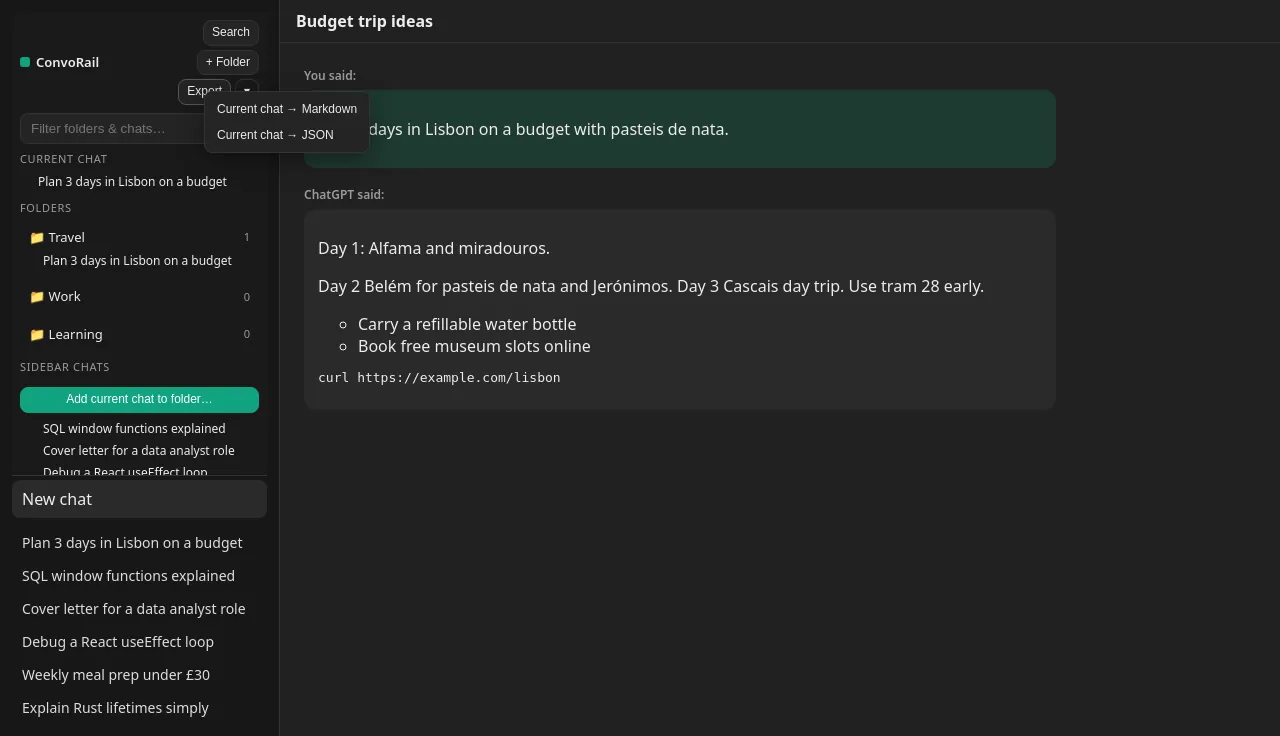
Export the current chat to Markdown or JSON, and back up your whole folder set from the popup.
Privacy
Your chats are private. So are your folders.
There is no ConvoRail server, account, analytics or advertising. Read the full ConvoRail privacy policy.
Stored in your browser
Folders and the search index live in your browser’s own storage.
No account
No sign-up and no login. Install and start filing.
No analytics or ads
We do not collect, sell or share your chats. The extension sends no personal data to us.
You hold the backup
Backups are files you save and keep. Move them between browsers yourself.
FAQ
ConvoRail questions
Is ConvoRail free?
Yes, and every current feature is free. When the optional Pro plan launches, the free plan keeps 5 top-level folders with unlimited subfolders, full-text search, Markdown/JSON export and backups. See pricing.
Does ChatGPT not have folders already?
ChatGPT has Projects, which share files and instructions across chats. ConvoRail folders are lighter: they just file a chat away without changing how ChatGPT behaves in it. Many people use both; our guide explains when to use which.
Will it change or delete my chats?
No. It only stores which folder each chat belongs to, in your browser. Your conversations stay in your ChatGPT account untouched.
Can I see my folders on another computer?
Not automatically, because nothing is synced through a server. Export a backup from the ConvoRail popup and import it in the other browser.
Does it work with Claude, Gemini or the phone apps?
ConvoRail works on ChatGPT in desktop browsers today. Claude and Gemini support is planned for Pro. It does not work inside the ChatGPT phone apps.
Is ConvoRail made by OpenAI?
No. ConvoRail is an independent product by Quiet Mooring Software and is not affiliated with, endorsed by, or sponsored by OpenAI. ChatGPT is a trademark of OpenAI.
Give your ChatGPT sidebar some order
Free, no account, and it runs on your device. Questions? Email quietmooringsoftware@gmail.com.
Free. Store listings are in review; links appear here as soon as they are live.