
 ArticleFerry · free browser extension
Send web articles to your Kindle as clean EPUBs
ArticleFerry turns any web article into a tidy EPUB file on your computer, without the ads, pop-ups and cookie banners, then helps you email it to your Kindle from your own approved address.
Free. Store listings are in review; links appear here as soon as they are live.
- Free and unlimited
- No account
- EPUB built on your device
Features
Everything you need to read the web on your Kindle
Made for long reads: news, essays, newsletters and blog posts you want to finish on an e-ink screen.
Clean article extraction
Keeps the story and drops the clutter: ads, pop-ups and sponsored lines.
Preview and edit
Check the title, author and word count, and fix them before you save.
Proper EPUB 3 files
A real ebook with its title, a cover and images embedded where possible, ready for Send to Kindle.
Right-click to send
Use the toolbar button or right-click any page and choose “Send page to Kindle”.
Your email, your control
Opens Gmail with your @kindle.com address filled in. You attach the file and press send.
Firefox, Edge and Chrome
The same extension on all three desktop browsers, including ones Amazon’s own tool does not cover.
How it works
From cluttered page to Kindle in three steps
Step 1
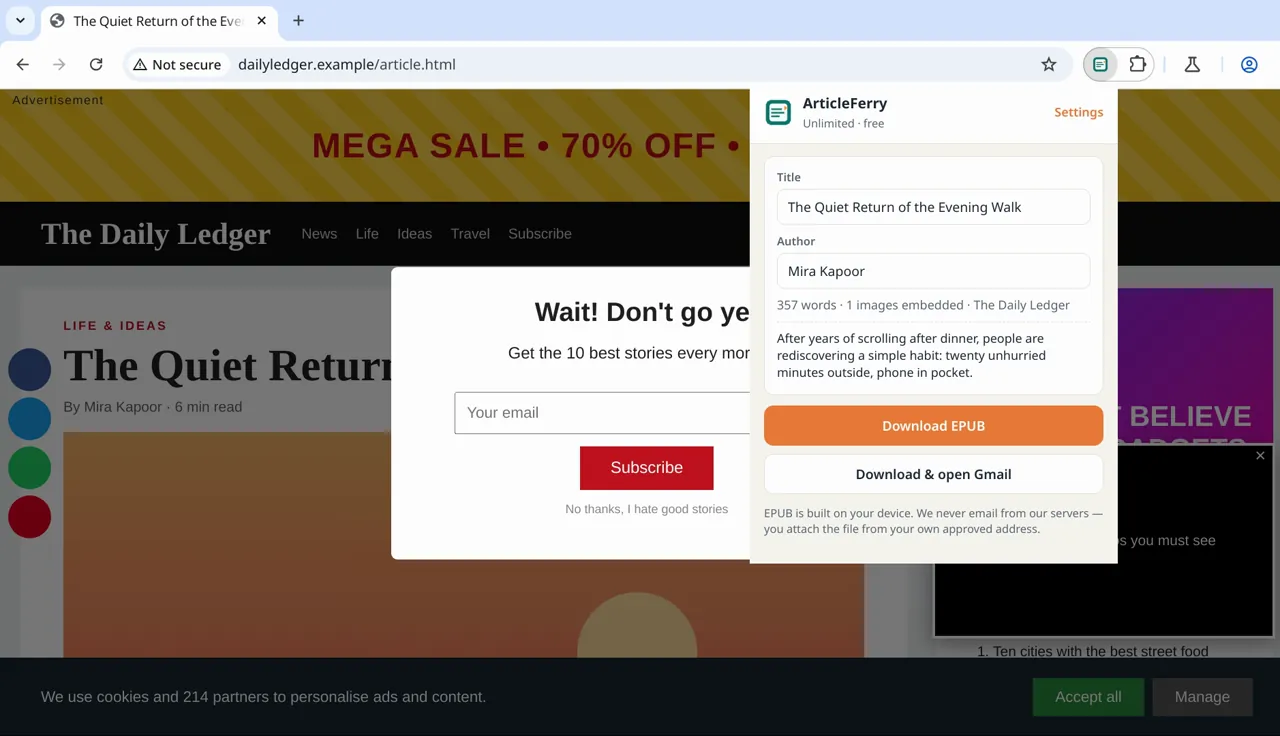
One click turns a cluttered page into a clean EPUB
Open an article and click the ArticleFerry icon. You get a preview of the title, author and length, and the EPUB is built right there in your browser.
Step 2
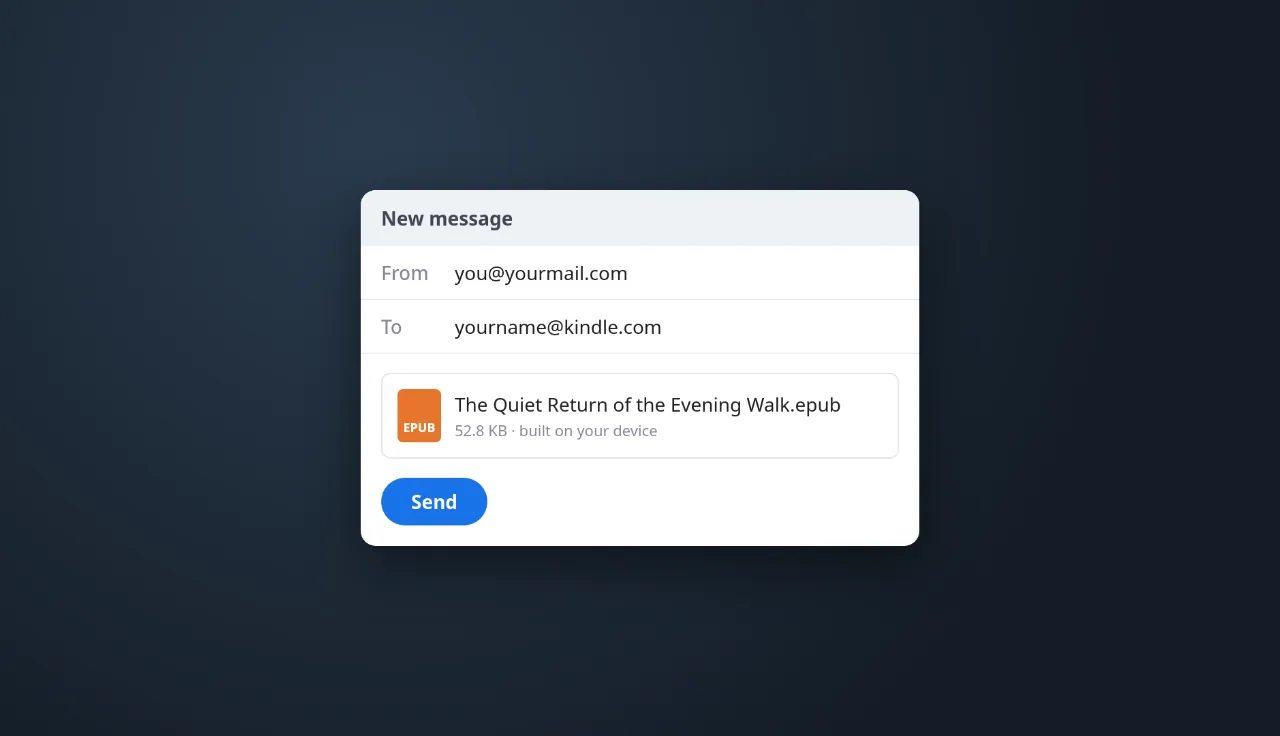
Email it to your Kindle from your own account
Choose “Download & open Gmail” and a new message opens, addressed to your Kindle. Attach the file and send. We never send email for you.
Set up once
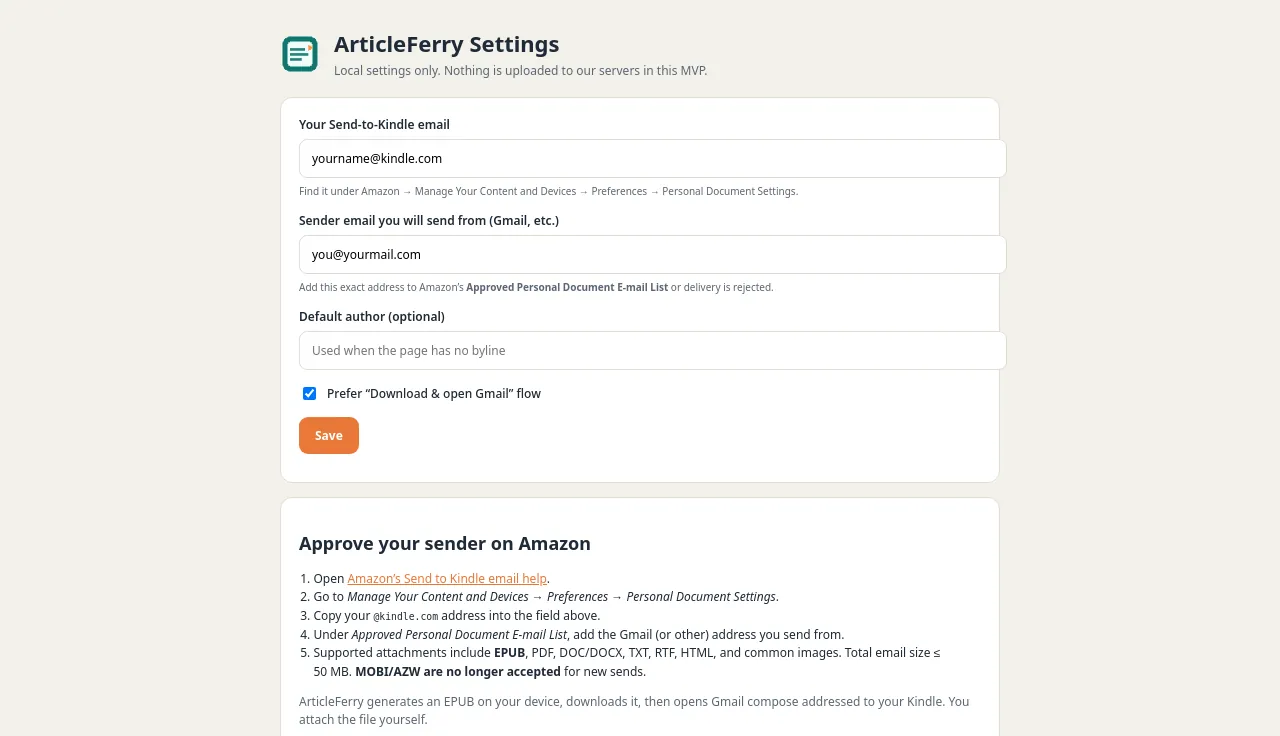
Add your Kindle address and you are done
Save your Send to Kindle address and approve your sending address in Amazon once. Settings stay on your device.
Privacy
Your reading list is nobody else’s business
ArticleFerry has no server, no account system and no email-sending service. Read the full ArticleFerry privacy policy.
Built on your device
Extraction and EPUB packaging happen in your browser. Pages are not uploaded to us.
You send the email
The file goes from your own email account to your Kindle. We never see it.
No analytics or ads
No analytics SDKs, no ad networks, nothing sold or shared.
No account
Nothing to sign up for. Your settings stay in your browser.
FAQ
ArticleFerry questions
Is ArticleFerry free?
Yes. Saving single articles as EPUB is free and unlimited. An optional Pro plan with a reading queue and a weekly digest is planned but not on sale yet; see pricing.
Does it upload the articles I save?
No. The article is read and turned into an EPUB inside your browser. ArticleFerry does not operate a backend or an email server.
Why do I attach and send the email myself?
Links that open your email app cannot attach files, and connecting to your mailbox would need access you may not want to give. So ArticleFerry builds the file and opens a ready-addressed message; you stay in control of your own email.
What do I need to set up in Amazon?
Two things, once: find your Send to Kindle email address, and add the address you send from to your Approved Personal Document E-mail List. Our step-by-step guide shows where both are.
Which browsers does it work in?
Firefox, Microsoft Edge and Google Chrome on desktop. The store listings are in review, and the install buttons switch on as each one goes live.
Is ArticleFerry made by Amazon?
No. ArticleFerry is an independent product by Quiet Mooring Software and is not affiliated with, endorsed by, or sponsored by Amazon. Kindle is a trademark of Amazon.com, Inc.
Read the web the calm way
Free, no account, and it runs on your device. Questions? Email quietmooringsoftware@gmail.com.
Free. Store listings are in review; links appear here as soon as they are live.